Flow
A Mac app that turns speech into text in any field, drafts replies from what is on screen, and keeps its memory on the machine.
- Status
- Beta. Private beta, shipped as signed and notarized builds. Version 0.12.0 in Nov 2026
- My role
- Lead engineer. I wrote most of the app, with a small team contributing.
- When
- Oct 2026 to present
- Context
- Perfstaq product
- Capabilities
- LLM apps, Agents, Memory, Voice, Desktop, Integrations
What it is
Flow started as dictation: hold fn, speak, and the text lands in whichever app has focus. Speech recognition runs locally through a bundled whisper.cpp, so audio does not leave the Mac.
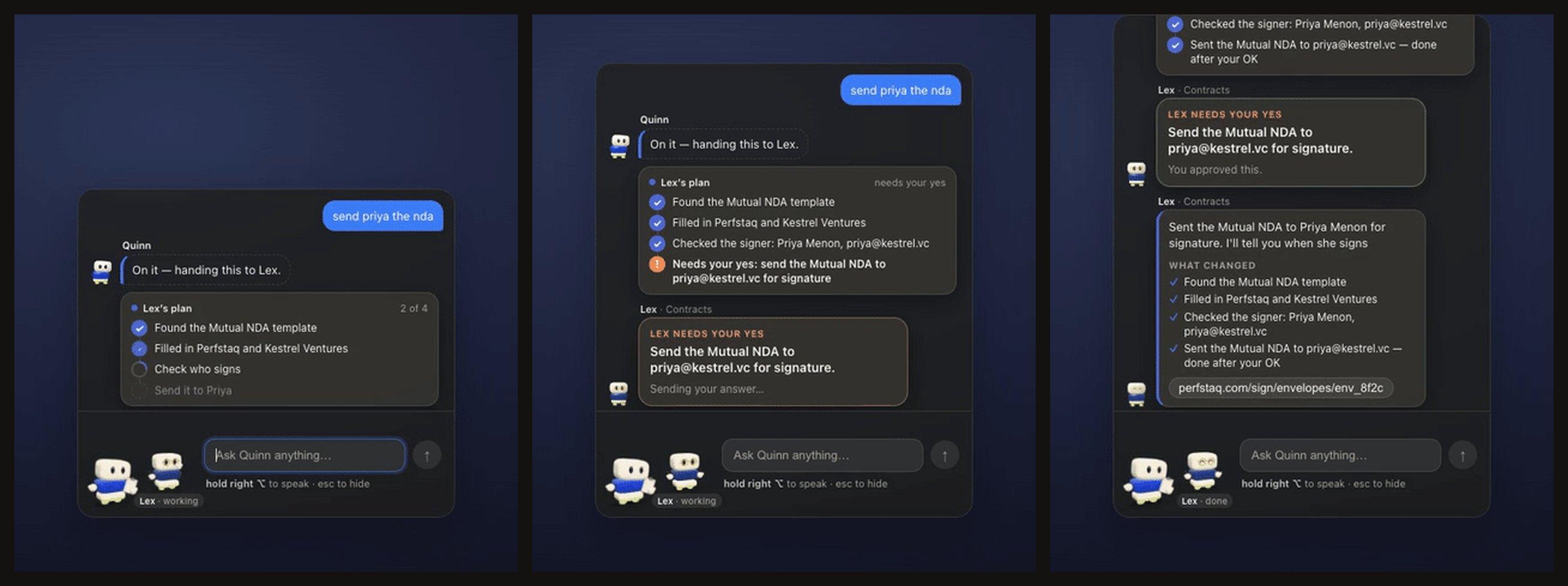
It grew two more parts. A writer drafts text for the field you are in, using what is on screen and what the app remembers about the person you are writing to. Quinn, added in 0.12.0, is an assistant that answers from the same memory and can prepare actions such as sending an agreement. Quinn and Flow are one app and one codebase, so I count them as one project.
What I built
I wrote the Electron main process and most of the features on top of it, and the Swift helper that does what Electron cannot: global key handling, reading the focused text field, inserting text, screen capture and OCR.
- Dictation pipeline: key hold, 16 kHz capture, local transcription, insertion into the focused field.
- Writer flow in four steps: locate the field, build a brief, review, insert.
- A local memory in SQLite with full-text search, fed by on-screen activity and read by both the writer and Quinn.
- An MCP server inside the app, so other AI tools on the same Mac can query that memory. It is connected to Claude on my own machine.
- Release pipeline: Developer ID signing, notarization, and builds published from CI.
Decisions
The writer prefers Apple's on-device models and falls back to a local Qwen3 through Ollama, so the default path needs no cloud model. Sending memory to the cloud is off unless the user turns it on.
Quinn follows one rule I use across projects: the model proposes, code checks, and a person approves. Anything that changes the outside world is put on a card the user has to hold to confirm.
When the app's display name changed to Perfstaq, I kept the bundle identifier and data directory. Renaming them would have reset macOS permissions and broken every existing MCP configuration.